<iframe width="560" height="315" src="https://www.youtube.com/embed/vwV_CWhuD8M" frameborder="0" allowfullscreen></iframe>
This was a short promotional video that I made for a client. This was my first time making something requested by an actual client that wasn't requested by the school. It was a very cool experience and I learned a lot from it. It was hard at first trying to meet the clients needs but overall it was very fun.
This video was a behind the scenes for an online ad agency. We didn't film much because time was limited, so we had to use some of the same style shots again.
Dec 14, 2016

Sep 1, 2016
The Interview Beat Sheet
Cyle Kobe
The Interview
Overall, the interview was a decent movie. It had a good general idea and was kinda carried out well, but it was pretty ridiculous. The language and overall things they did/talked about was pretty ridiculous and pretty offensive. Still hilarious though.
Opening Image: Little girl sings anti USA propaganda in front of a rocket launch
Opening Image: Little girl sings anti USA propaganda in front of a rocket launch
Theme Stated: Challenge
yourself to do better
Set-Up: Kim Jong
Un is found out to be a fan of Skylark Tonight, and Idea comes to Dave
Catalyst: They
leave a message for North Korea, and North Korea calls back
Debate: They are
discussing terms of an interview
Break into Two:
CIA comes and convinces the boys to try and assassinate Kim
 |
| The boys talk to the CIA |
B Story: We
realize Kim is feeling sad about what people say about him
Fun and Games: They
boys have fun with Kim and his cars, tanks and other things
Midpoint: The
boys become friends with Kim
Bad guys close in: Dave
realizes everything Kim has been saying is false all in hopes to sway his opinion.
All is Lost: The
bad guys try to stop the interview with force
Dark Night of the
Soul: They prepare to sabotage the interview with their new partner, a worker for kim
Break into Three: They
sabotage the interview, exposing Kim and his country
Finale: Kim is
blown up by Dave and Aaron using the tank they used to escape from the compound
 |
| Them escaping with their partner |
Final Image: Dave
is reading his tell-all out loud, recapping everything that happened.
May 19, 2016
Animation Reflection
I learned many important things over the course of the school year in animation, one main thing being I learned about the Adobe Suite more and Maya. I learned this by being involved and originally enrolling in animation gave me the opportunity to learn more.
This is important for anything I do in the future. I plan to go into video and I can incorporate what i learned this year into what I make in the future. I can also use this if I plan on being involved in animation in the future. I have many opportunities because of this class and I am very grateful.
I wouldn't say I have many strengths in this class, most things were pretty hard for me to do. I had to ask my neighbors for help many times and I struggled a good amount also. I have some strengths, however. One being I was good with green screen and keying out the green screen. I was also good at a few things in Maya like motion paths and curving things. I have however improved greatly on just my knowledge and technical ability over the course of the year. I am much better now than I was in September or October.
If there was anything I would change it would definitely be my work ethic at the beginning of the year. I feel like I definitely fell behind and I didn't understand much of anything that was going on. I had to ask for help many times and struggled a lot. I feel like I can definitely handle this class now just not at the beginning of the year.
In conclusion, I would like to thank Mr. Netterville for a great year in Animation. He definitely helped me a lot and his class was so much fun to be in. His classroom had a very comfortable, lighthearted atmosphere and everyone in the class also felt this. Netterville also knew what he was doing with the programs and how to help us which was very good. Thank you Mr. Netterville!
This is important for anything I do in the future. I plan to go into video and I can incorporate what i learned this year into what I make in the future. I can also use this if I plan on being involved in animation in the future. I have many opportunities because of this class and I am very grateful.
I wouldn't say I have many strengths in this class, most things were pretty hard for me to do. I had to ask my neighbors for help many times and I struggled a good amount also. I have some strengths, however. One being I was good with green screen and keying out the green screen. I was also good at a few things in Maya like motion paths and curving things. I have however improved greatly on just my knowledge and technical ability over the course of the year. I am much better now than I was in September or October.
If there was anything I would change it would definitely be my work ethic at the beginning of the year. I feel like I definitely fell behind and I didn't understand much of anything that was going on. I had to ask for help many times and struggled a lot. I feel like I can definitely handle this class now just not at the beginning of the year.
In conclusion, I would like to thank Mr. Netterville for a great year in Animation. He definitely helped me a lot and his class was so much fun to be in. His classroom had a very comfortable, lighthearted atmosphere and everyone in the class also felt this. Netterville also knew what he was doing with the programs and how to help us which was very good. Thank you Mr. Netterville!
May 13, 2016
Professional Article Review
http://www.nytimes.com/2015/12/18/movies/star-wars-the-force-awakens-review.html?_r=0
This article was all about the new Star Wars movie. The main points of it were: JJ Abrams learned from the best, JJ did a really good job at casting minorities and that JJ did really good at staying true to the original movies. The author was mainly arguing and claiming that JJ did really good by learning from Lucas and Spielburg, and staying true to their movies. The strengths of this article is that it gives really good evidence, and a weakness is that it only stays on one main topic. This is a very good article about the new Star Wars movie
This article was all about the new Star Wars movie. The main points of it were: JJ Abrams learned from the best, JJ did a really good job at casting minorities and that JJ did really good at staying true to the original movies. The author was mainly arguing and claiming that JJ did really good by learning from Lucas and Spielburg, and staying true to their movies. The strengths of this article is that it gives really good evidence, and a weakness is that it only stays on one main topic. This is a very good article about the new Star Wars movie
May 11, 2016
Professional Project Review
The professional project I reviewed this time was an animation called "The Colors of Evil." It was an animation mainly about a girl that was bullying another girl, and justice was served in the end with the help of a demonic presence.
The animation was very well done and included some really good detail. For example, the hair is textured to match the lights in the setting. Everything else including the demon especially has very good detail.
One element I would apply to my work is the use of strong, bright colors. This animation has very vivid colors and it looks very nice. I already know how to do this but I haven't applied this to any projects yet.
The creator did many things well, like making the characters look very good. They were colorful and full of detail. One thing he didn't do very well however is add enough detail to the background. I think this was a very good animation, I would be very proud of it if it was my own work.
Mar 11, 2016
Technical Tutorial
Hello, today I am going to show you how to make a motion path and attach a camera to it for animation purposes in Autodesk Maya.
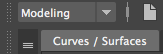
First, make sure you are in modeling and on the Curves / Surfaces tab. This tab holds everything you need for making a motion path.
Now, select your shape and scale it to the desired size.
I went with a circle. I then scaled it to the desired size

Now, go to the Rendering tab and select the Camera
Now drag your mouse over both objects, selecting both.

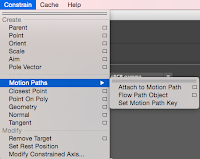
Next, go from Rendering to Animation. Then at the top, select Constrain>Motion Path>Attach to motion path

Now, your camera is attached and you can continue with Animating!
First, make sure you are in modeling and on the Curves / Surfaces tab. This tab holds everything you need for making a motion path.
Now, select your shape and scale it to the desired size.
 |
| This is all the tools you can use to make a motion path |
I went with a circle. I then scaled it to the desired size

Now, go to the Rendering tab and select the Camera
 |
| It is the one with the camera on the grid |
Now drag your mouse over both objects, selecting both.

Next, go from Rendering to Animation. Then at the top, select Constrain>Motion Path>Attach to motion path

Now, your camera is attached and you can continue with Animating!
Feb 24, 2016
Personal Blog Post
This is my personal, animated logo. We had to design a logo in Adobe Illustrator, save it so it could go into Maya correctly, then Animate it. It was a fairly easy project. I spent the majority of my time designing my logo and getting the right colors I wanted. I learned in Maya how to:
- Apply a camera to a motion path
- How to make a motion path
- How to render out using the attached camera
- How to open an Adobe Illustrator file in Maya correctly
- How to change the direction and path of a camera in the graph editor
 |
| Final product after designing and animating |
If I do something like this again, I will definitely use the motion path and camera. I found it to be really easy and simple to attach a camera to a simple motion path. I put the logo in a box so I could get rid of the black background and shift the viewers attention to be solely on the logo.
This was a very fun project, and I learned tremendously about different techniques.
Dec 16, 2015
Video Final
Our semester final for convergence journalism was a full news package that we made entirely. We all had specific stories, mine was about an underclassmen play. I got my partner, made a story and submitted it for the final. The final news presentation was relatively easy as all I had to do was submit my story and operate the camera. Every little job had someone that was in charge of it and I feel like our news show went pretty well. I really liked working in this group setting as there was tons of collaboration and feeding off of other peoples' ideas. Our group cooperated pretty well, which was good because we were all in the same finals-mindset. We definitely worked well together. There was some confusion on what exactly to do though, as we didn't have much help from teachers. If I were to assign this project to students, I would assign it much earlier than when we got it. Our group was kinda stressed out with thinking about upcoming deadlines. Heck, even some of our final news stories weren't done on the day of filming. This would've been avoided if we would have gotten the project even a week earlier. I learned a lot more about news rooms and their equipment, and what the people go through to push out these news packages. I have developed a new found respect for all of those associated with convergence journalism, mainly our school's news team.I didn't learn very much more software skills though, as I am fairly familiar with all the programs we used. If I do something like this again, I will definitely manage my time better as something I lacked was time. I hope to learn more about the behind-the-scenes of news and what makes a successful news story.
Dec 15, 2015
Technical Tutorial
I am going to teach how to use the EP Curve tool in maya to make a cup. First, to make it easier, you should start working in side view. Then, select the curve tool and start on the Y line. Make your base however big you want.


Then, proceed to make your base. this can be whatever shape you want.

Now, drag your curve up and make the rest of your cup in any desired shape. Remember to end your line on the same Y line you started on.

Then, use the revolve button to revolve the rest of your cup, to make an actual cup.

And now you have your cup! (I made my base too big.) You can now add some background with whatever you want.
Dec 9, 2015
Story Animation
Our most recent animation project was a story. We had to write up a storyboard, design characters, and animate it all out using mainly photoshop and after effects. 


Here is two of my storyboards i used as a guide while animating. I did however choose to leave a few scenes out due to deadlines. My main focus on this project was to animate a man following love around the country, all to get heartbroken in the end.

Here is what i drew out the characters as. I took these into photoshop, pieced their bodies together, and the animated them out in after effects. The animation was pretty easy, all I mainly had was walk cycles with different backgrounds pieced into multiple compositions.
Subscribe to:
Posts (Atom)